v11.0.1 · Android · Full Release

UniVersus

Companion

The only companion app built for UniVersus

I built the UniVersus Companion because nothing like it exists right now and every other TCG gets these awesome tracker tools to use. UniVersus is an amazing game that brings anime and fighting games together in one big package — it's high time it gets the proper tool it deserves. Customize the companion however you want, no wrong way to use it, multiple ways to set up matches. Mostly offline, completely free, no ads, no account needed.

Get it on Google Play See Features ↓

Free • No account • Offline • Android

New to UniVersus? Learn the game · Find events near you

Been here before? See what's new →

Community decks

Point your camera at a deck, play it tonight

Browse ready-made decks and pull one straight into your Deck Builder with the app's scanner, or copy the forum code and paste it. Either way, nobody types out a card list.

Browse decks →
See it in action

Casual Match — full run

Scanning cards into your collection

Building a deck by scanning it

Importing a deck via Forum Code

Building a deck from scratch in the app

Boss Battle — co-op PvE

Get it on Google Play

Free · No account · Android

🎮
BUILT AT THE TABLE
I play UVS and I built this for myself first. Everything in here is something I actually wanted at the table.
⚡
CASUAL TO TOURNAMENT
Quick game with a friend or a full tournament run — same app, just pick how you want to play.
🔒
FREE FOREVER
Completely free, no ads, no account needed. I'm not trying to monetize the community, I just want people to have a good tool.
Match HP Tracker
Match Tracker
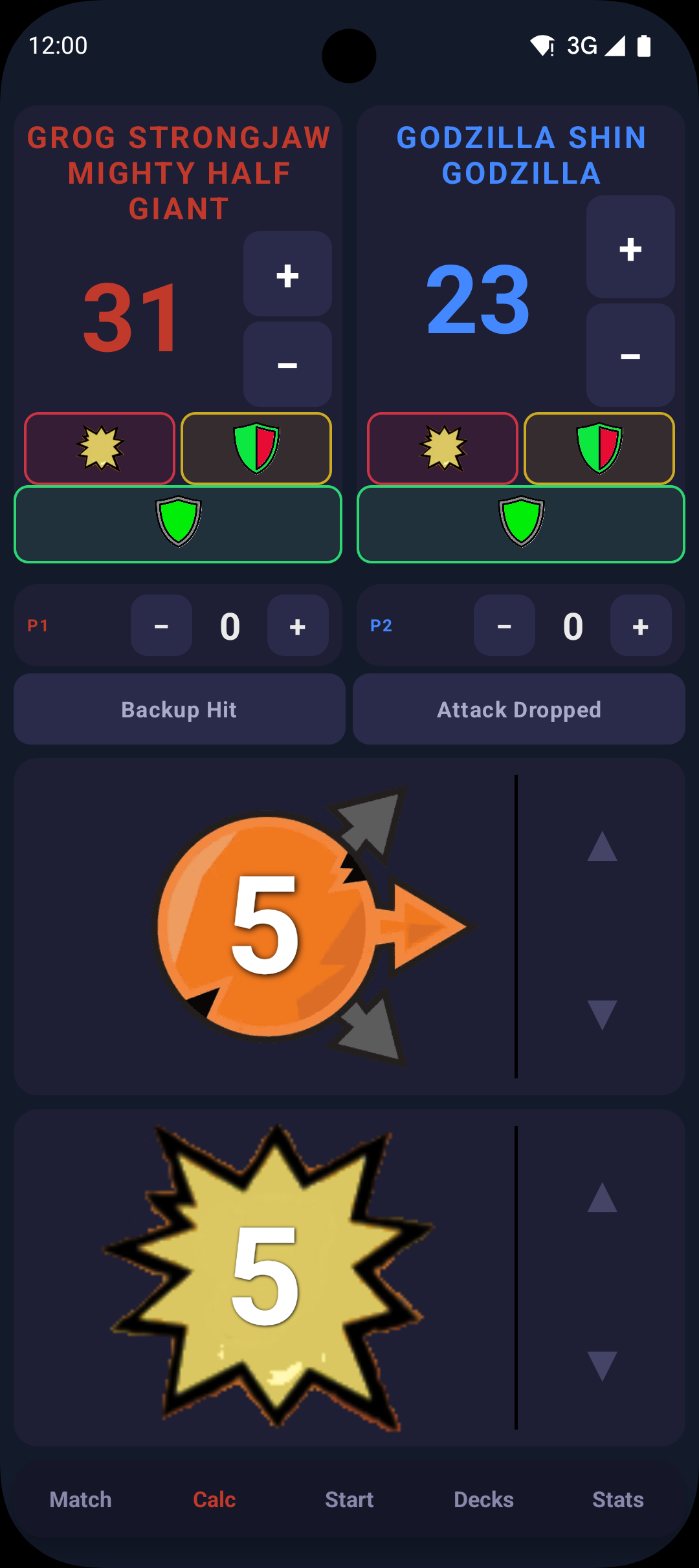
Attack Calculator
Attack Calc
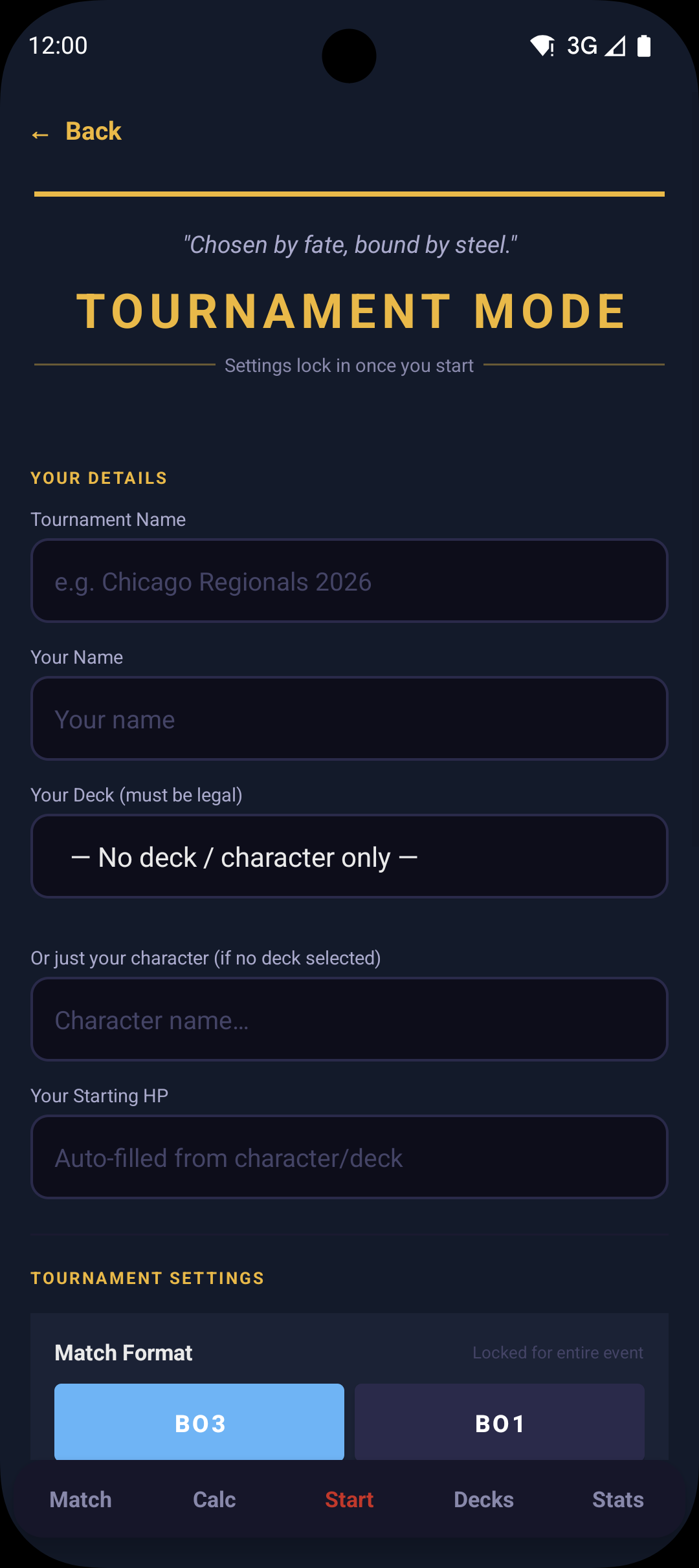
Tournament Mode
Tournament Mode
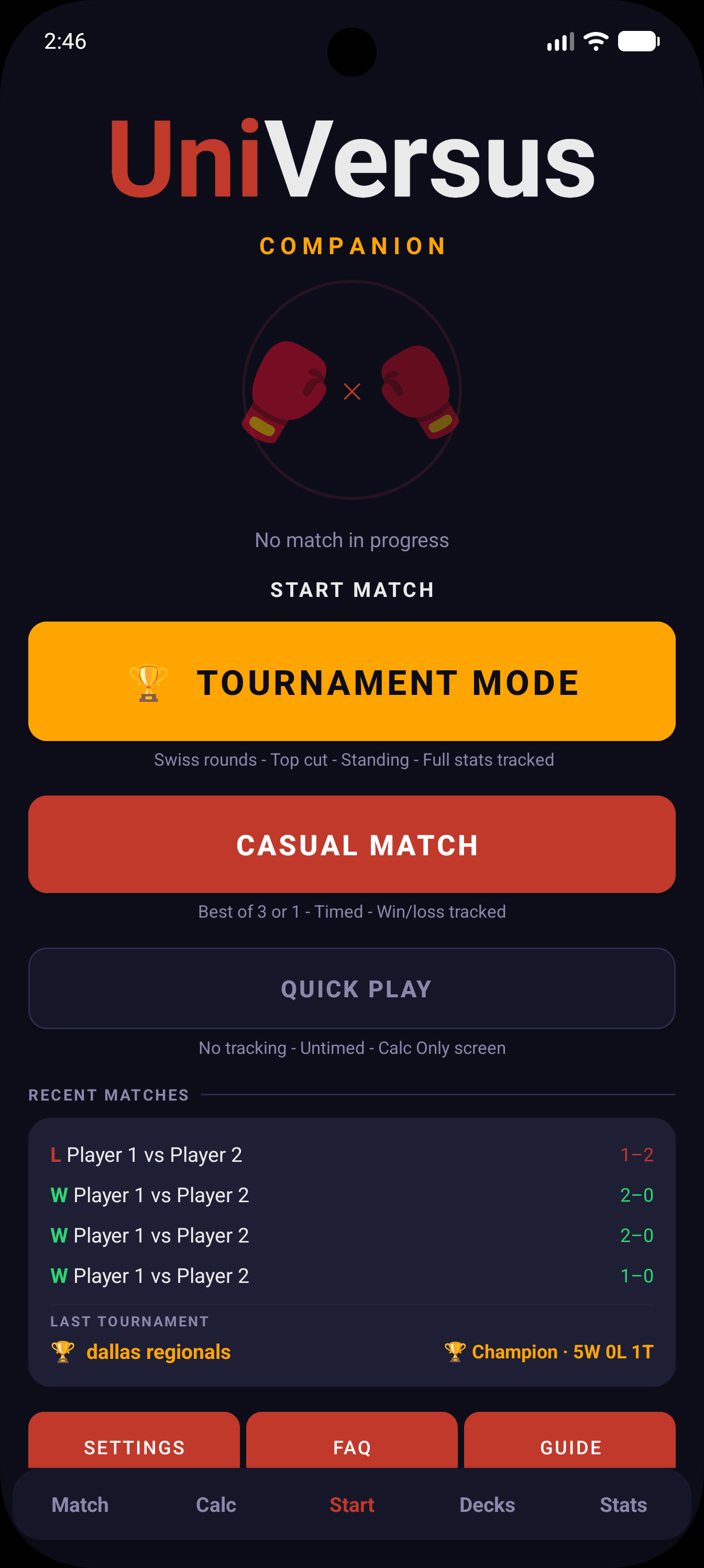
Home Screen
Home
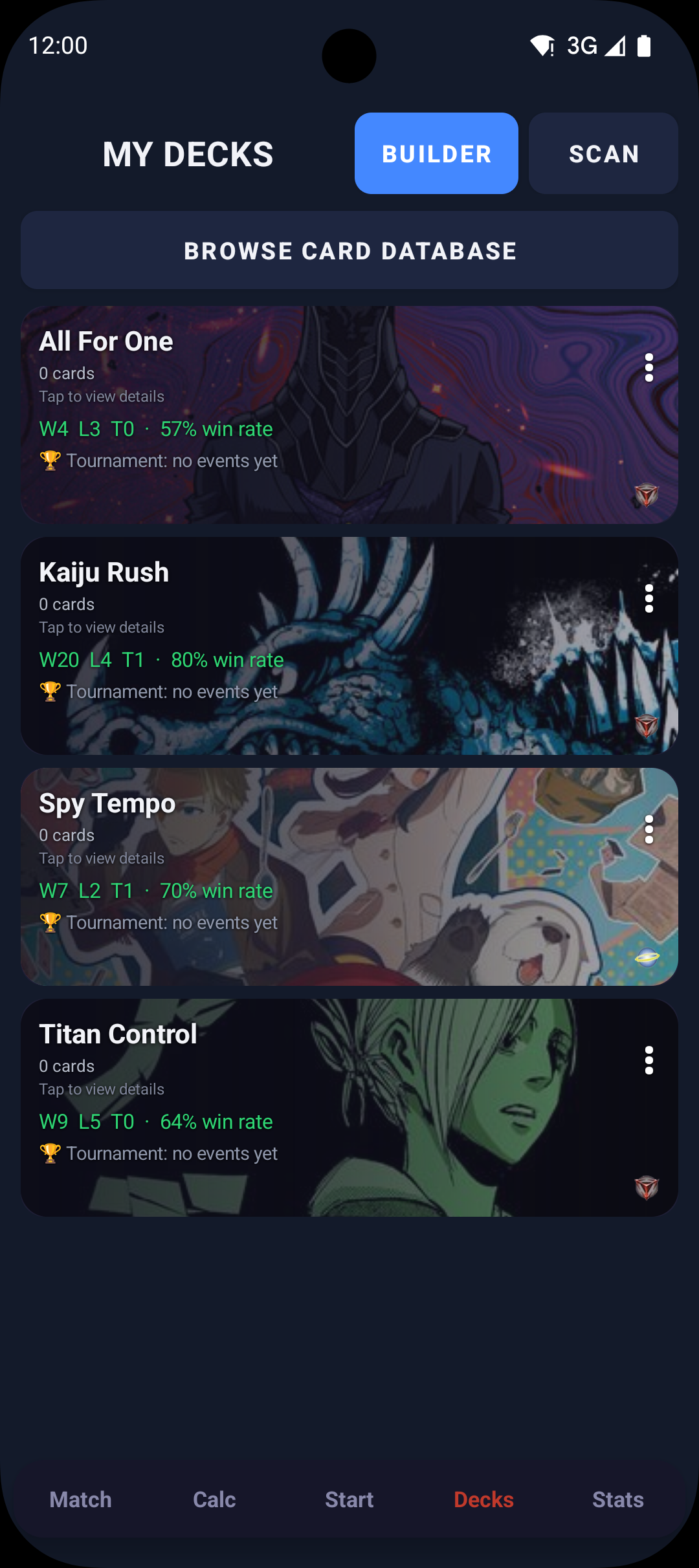
Saved Decks
Saved Decks
Deck Hub
Deck Hub
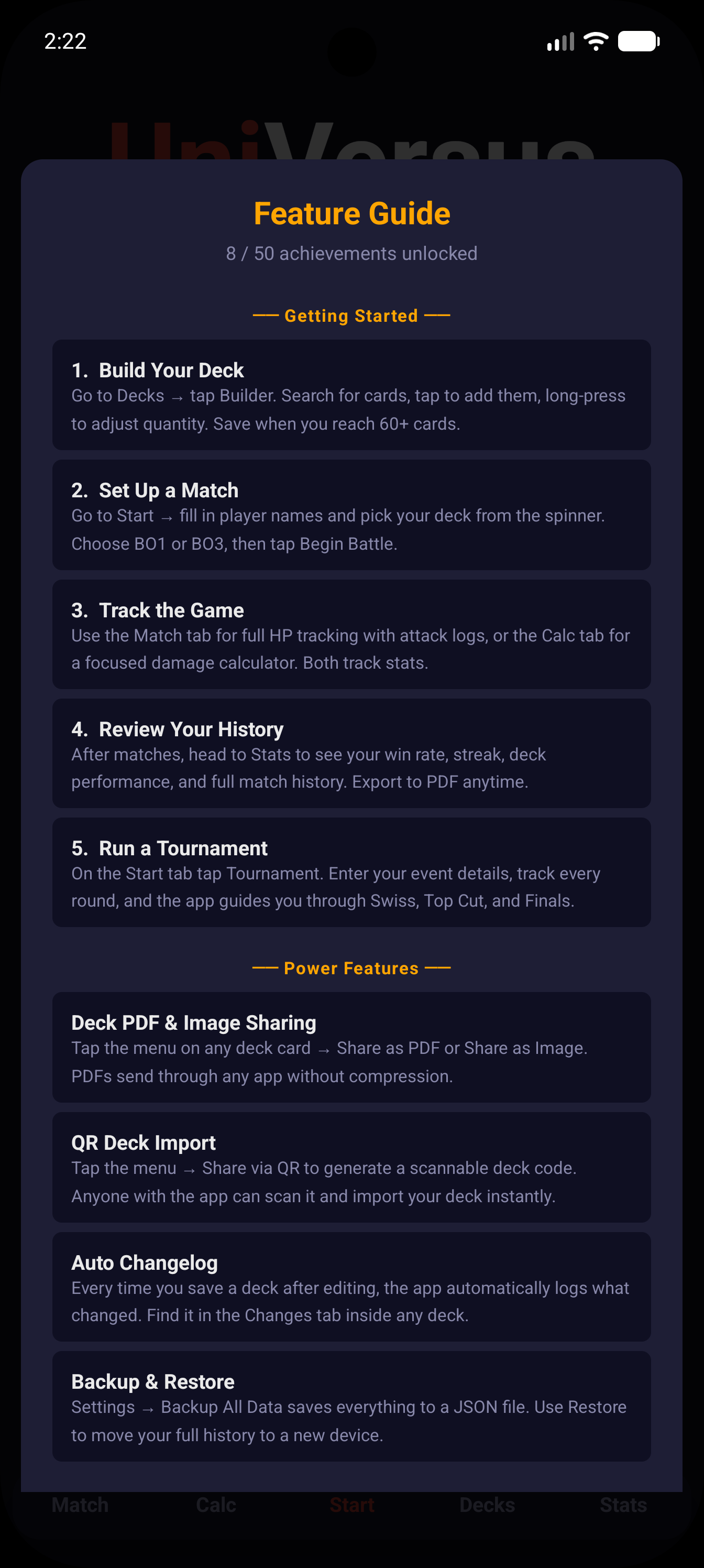
Feature Guide
Feature Guide
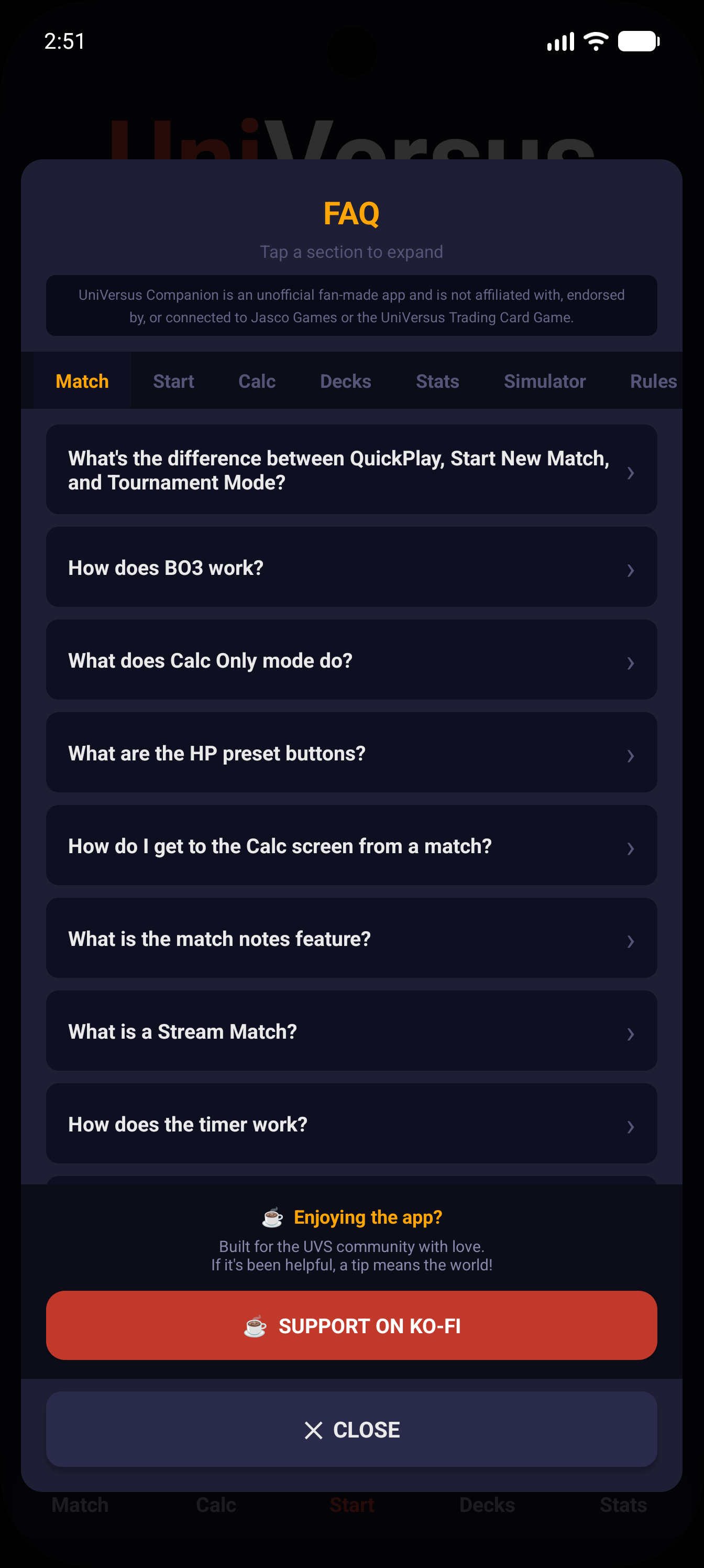
FAQ
FAQ & Help
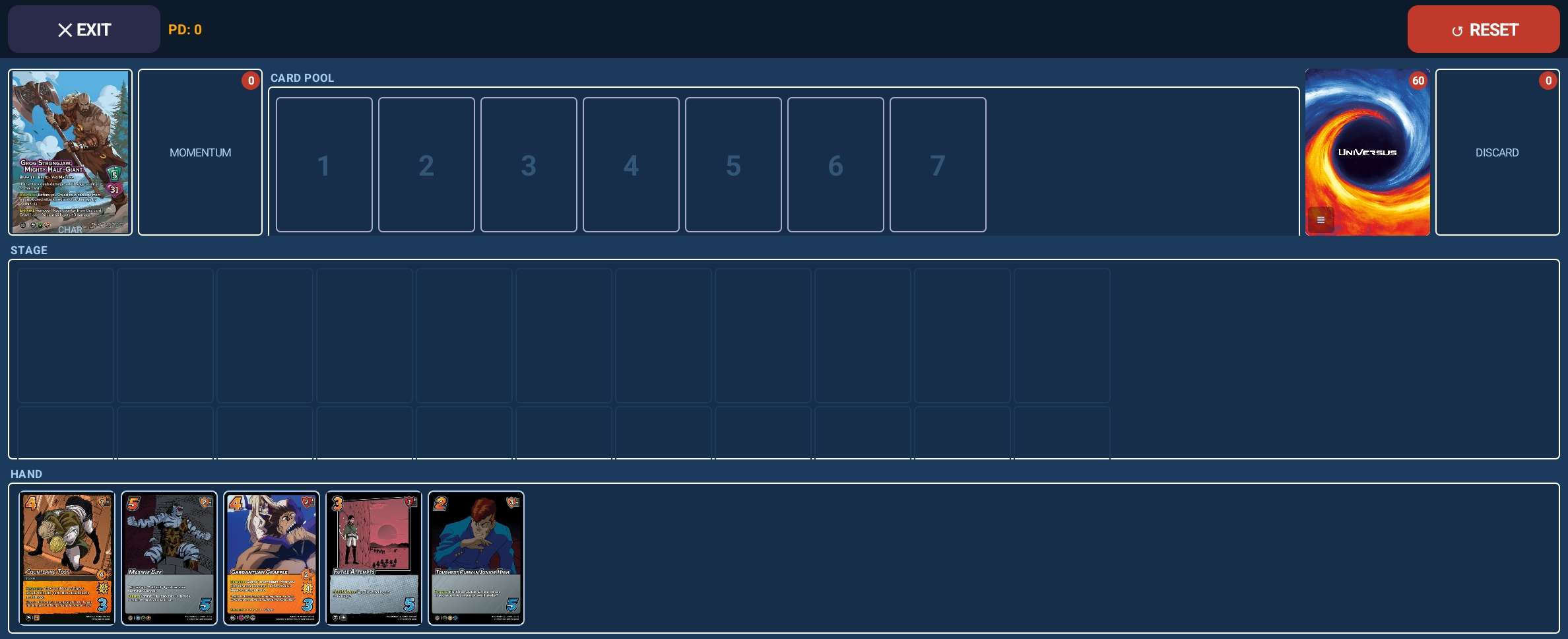
Deck Simulator
Deck Simulator
What's inside the app
Five tabs. Built around how you actually play.
Match
HP Tracker & Attack Log
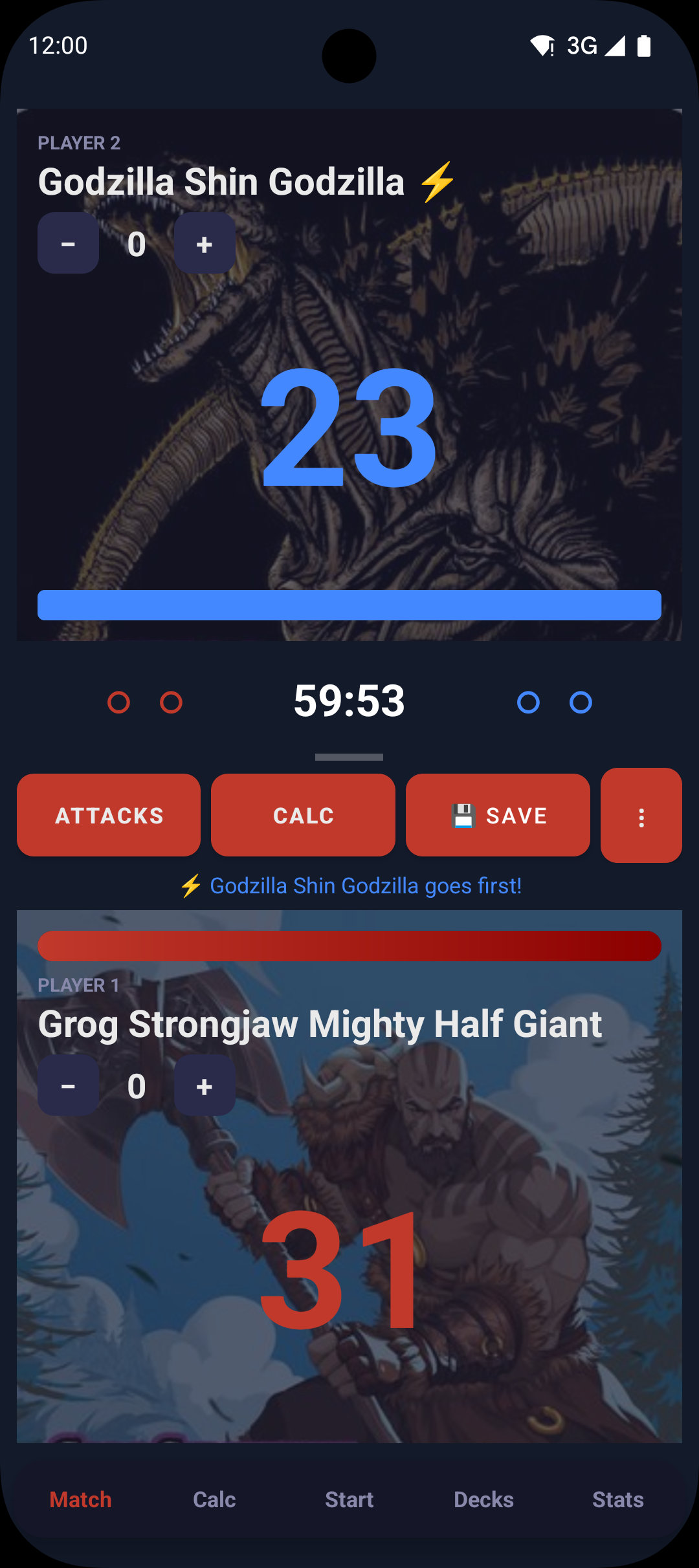
HP for both players, color-coded as it drops, plus a per-player counter for character-specific stuff like Rage, Destoroyah, King Ghidorah, bullet counters and more. Attack log records every hit automatically. Tracks game scores in BO1 or BO3, auto-saves when the match ends, and has a timer for all four formats. Tap either player's HP to jump to the Calc tab mid-game, then come back with the damage already applied.
Calc
Attack Calculator
Enter the speed and damage, pick the attack zone, then tap Unblocked, Half Block, or Full Block to apply damage instantly — color-coded so you always know which is which. Tracks HP for both players with automatic KO calls. In a full match it snaps back to the Match tab after a block and plays the damage animation. Backup Hit and Attack Dropped buttons handle edge cases without touching HP. Running Quick Play, or choosing Calc Only during casual or tournament setup, turns it into a full lightweight match tracker with BO1/BO3 series support.
Start
Home & Match Setup
Your home screen. Start a full tracked Casual Match (BO1 or BO3, timed, saved to history), jump into a Quick Play session with a quick minimal setup to get into a game fast, or enter Tournament Mode to track every round from Swiss through Top Cut and Finals.
Decks
Deck Builder & Simulator
Build decks directly in the app from the full card database, or import a list you built on uvsultra.online using its Forum Code. Share via QR or PDF and test hands solo in the Deck Simulator.
Stats
Match History & Archives
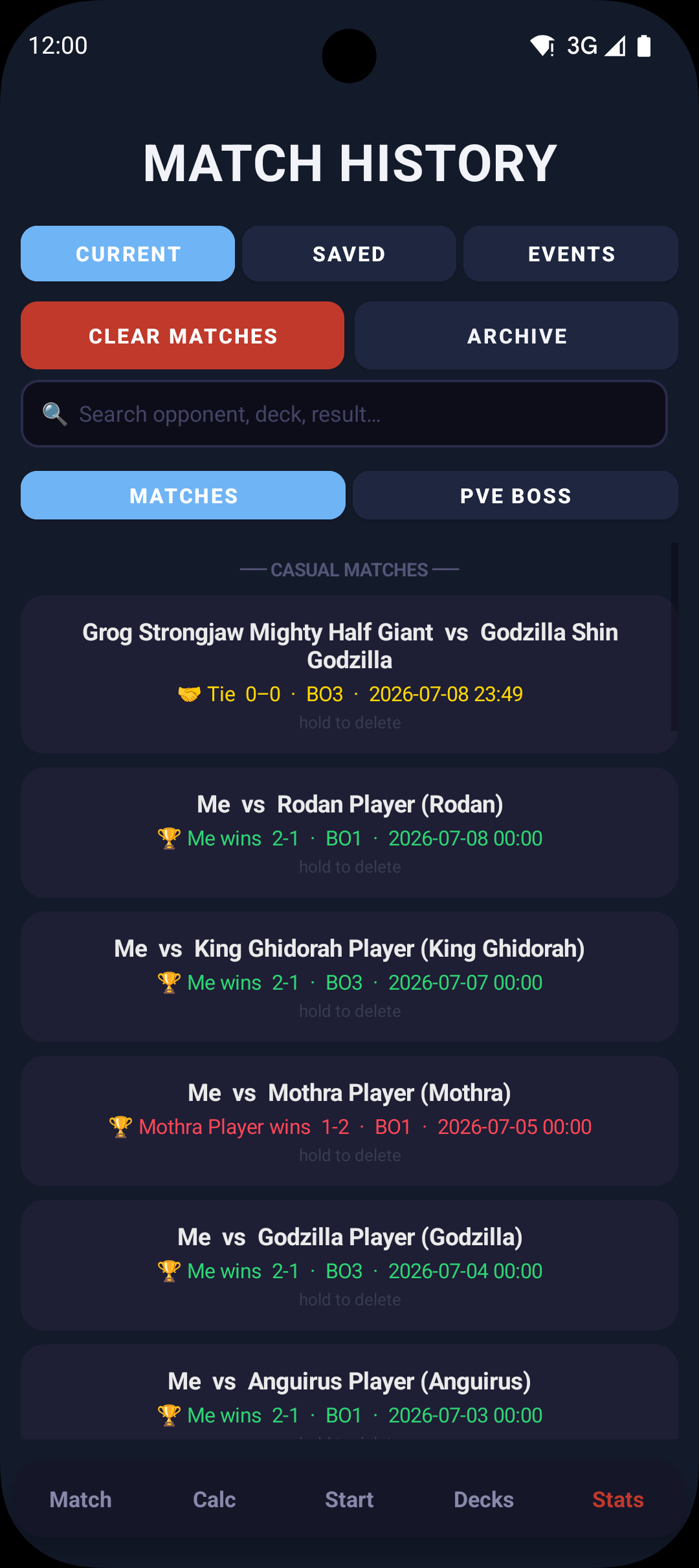
Three views: Current is your full match history grouped by event and casual session, color-coded and searchable. Saved holds any named archives you've created — locked snapshots of a past stretch with W/L/T totals. Events has every completed tournament round by round. Any of them can be exported as a PDF.
Features

Everything you need at the table

Here's what's actually in the app and what each part does.

Start
Match Setup & Game Modes
Casual, Quick Play, Calc Only, or a full tournament from Swiss through Finals. Characters fill in their own starting HP.
Match
HP Tracking & Attack Log
HP for both players plus per-character counters. Every attack logs itself — direction, speed, damage, block result — so you never write anything down.
Match
BO1 & BO3 Series Tracking
Best-of-1 or Best-of-3. It tracks game scores and who went first, then calls the series. Ties handled right, no HP tiebreaker nonsense.
Match
Match Timer
Best of 3, Best of 1, Top Cut and Finals timings built in, with overtime and time-over calls made for you.
Calc
Attack Calculator
Put in the speed, damage and zone, then hit Unblocked, Half or Full Block. Damage lands right away and KOs call themselves.
Boss Battle
Co-op Boss Battle (PvE)
Team up against a boss instead of each other. Its HP scales to how many of you there are, and if you close the app mid-fight it picks up where you left off.
Tournament
Full Tournament Tracking
Log a whole event round by round, one day or two. It saves to Stats and exports as a PDF.
Tournament
Stream Match Mode
Mark an event as streamed and it asks each round, so you can punch the result in yourself when you're on camera.
Decks
Full Deck Builder
Search the card database, tap to add, long-press for quantity. Legality checks run live and cards sort themselves into sections.
Collection
Card Collection
Track what you own set by set, earn a trophy for completing one, and see which decks are holding your spare copies.
Collection
Scan Cards With the Camera
Point the camera at a card and it goes in — no button, no confirming. Fill a collection or build a deck off the physical pile.
Decks
Forum Code Import & QR Sharing
Paste a forum code to import a deck, or share yours as a QR code anyone with the app can scan.
Decks
Auto Changelog
Every save records what went in and what came out, so you can trace how a list got where it is.
Decks
Deck Simulator
Shuffle, draw and play your real list solo across hand, pool, stage, momentum and discard. Good for checking opening hands or just getting reps in before a tournament.
Stats
Match History
Every match saved and grouped by event or session, searchable across opponent, deck, result, date and notes at once.
Stats
Opponent Character Tracking
Opponent characters save with every match, so you can pull your record against any character, overall or with one deck.
Stats
Archives & PDF Export
Archive a season under its own name and keep every tracked event round by round. Both export as a PDF.
App
Backup & Restore
One file holds the lot — matches, decks, tournaments, stats. Load it on any Android phone and you're right back where you were.
App
In-App Feature Guide & FAQ
A walkthrough of every part of the app, plus a searchable FAQ. Both work with no internet.
App
Fully Offline, No Account
Everything works offline bar two things: card images, which pre-load over Wi-Fi, and sending a deck to the gallery. No account, no login, nothing to sign up for.
Patch Notes

What's new

The app is updated regularly based on player feedback. Every change gets documented here.

v11.1
Latest
September 2026
New
Challenger: Street Fighter 6 2026 — both challenger decks and the two promo characters that come with them Send a deck to the gallery on this site, straight from the app. Tap the menu on any deck and pick Submit to Gallery — there’s nothing to fill in, it already knows your record with the deck and where it placed A deck you’ve sent says where it got to on its own card, and its menu gains Update and Ask for removal
QoL
Step through your collection without closing anything — open a card and there are arrows to the next one, so setting counts for a whole set isn’t open, close, open, close
Fixes
Deck lists imported before a set shipped showed raw card codes where the names should be. They sort themselves out now, the first time you open the deck after the set lands
v11.0.1
Release
September 2026
Fixes
Damage on the calculator goes below zero now, the same as speed always could — it still deals nothing when it lands, it just lets you keep count on the way there The + and − buttons stop staying lit after you hold one down Cards show whole in the card database and the deck builder — the top and bottom of every one was being trimmed off, which took the cost off one end and the set line off the other
QoL
What’s New tells you what is actually new since the version you were on, and folds the rest away
v11.0
Release
September 2026
★
Card Collection — track what you own set by set, with trophies for filling one out Scan cards in with the camera, either into your collection or straight into a deck you're building
New
The Deck Builder knows what you own — how many copies are spare, and which decks are holding the rest Banned cards get called out on the card and when you check a deck, so you don't build around one by mistake Backups look after themselves, and now carry your boss battle records too
QoL
The result screen knows when you lost — it used to hand you a trophy and announce the other player's victory End Match asks before it ends anything, everywhere, instead of the old press-and-hold Card names match what's printed on them, and a few hundred cards filed under the wrong set have been sorted out
Fixes
Tournament rounds now count however you finish them — a round could previously vanish off your record if you left the result screen the wrong way Ending a boss run from the Start screen saves it instead of discarding the damage you'd done Long character names no longer push the life totals off the calculator A pile of buttons had been stuck on red by a theme quirk — they have their own colours back
v10.0
Release
July 2026
★
A bold new look — a top-to-bottom redesign with a lit navy palette, cleaner panels, and a Start screen rebuilt around how you actually play
New
The Start screen now greets you with a rotating highlight about your own play — win streaks, your best deck, favorite matchups and more — with a shuffle button to roll another A "Your Decks" shelf on the Start screen shows your decks at a glance with their win-loss records; tap one to jump straight into building it
QoL
Casual, Boss Battle, and Tournament setup now all warn you the same way when the character you enter doesn't match your selected deck — so a game never gets logged to the wrong deck
Fixes
The match timer now resets to the full clock when there's no active match, instead of sometimes carrying a running clock over from a previous game
v9.0
Release
June 2026
★
Out of early access — this is the full release. A stability and polish pass across the app.
QoL
The Quick Play button on the Start screen now has a blue trim and brighter text, so it reads as an available action instead of a disabled one
Fixes
Calc: the speed and damage you've dialed into an attack no longer reset to your presets when you background the app or switch tabs and come back Stats: your match history no longer renders two or three times (with a brief freeze) when the app reopens after being killed in the background — it loads once now Deck Hub: tab content can no longer briefly double-render when you switch tabs quickly The app now reliably reopens on the Start screen after being killed in the background, instead of the last tab with the wrong tab highlighted Boss Battle: closing the app on the victory screen and resuming now re-shows the Save / revive prompt instead of leaving the boss at 0 HP
v8.5
Release
June 2026
★
Quick Play now tracks like a real match — and announces itself so you never forget one's running.
New
Quick Play matches now save to your history, tagged "QP" — finally see how many you played and against which characters. Never counts toward a deck's win/loss, since Quick Play carries no deck A "Quick Play in progress" card on the Start screen with a Resume button — tab away mid-match and it's still there, drop right back in where you left off
QoL
The victory screen now shows the character you played even without a deck selected — Calc Only matches match the full-match screen now "Start a New Match" on the victory screen drops you straight into a clean match setup (opponent cleared, scrolled to the top) instead of the home menu
Fixes
Boss Battle no longer needs a built deck to set your character — pick a character by name (autocomplete) or a deck, just like every other setup screen Leaving a Quick Play match mid-game now saves it as Unfinished instead of vanishing
v8.4
Release
June 2026
★
Boss Battle mode is here — and the new MHA set is in the database the day it drops.
New
Boss Battle (PvE) — team up against King Ghidorah, Godzilla, or Gigan. Shared boss HP that scales with your party, your own life and personal damage tracking, same attack flow as the Calc screen Boss battles persist like real matches — tab away and the Start button becomes "Resume", force-close the app and it offers to bring the fight back PVE stats in their own lane — a Matches / PVE Boss toggle in Stats plus a per-deck PVE tab, and none of it ever touches your real match record MHA09 Challenger Series — all 41 cards from both decks (Deku / Armored All Might and All For One / Shigaraki) with full stats, symbols, and ability text Deku's deck-building rule actually works — the legality checker knows Vestige foundations are allowed regardless of symbols, and tells you so Send Feedback button in the FAQ — opens an email with your app version and device pre-filled
Fixes
81 older cards were missing their ability text — all transcribed from the actual cards (Attack on Titan, Yu Yu Hakusho, Godzilla, TMNT, Star Trek, and more) Four transform back-faces (the AoT titans and Sung Jinwoo's skill trees) were placeholder entries — now complete with stats and abilities Leaving a boss battle always asks first — a KO or a win can't be lost without saving Long Stats titles like "Tournament History" no longer get clipped
QoL
Damage numbers flash when hits land in boss battles, just like the Calc screen The screen stays awake during a boss fight — same as Match and Calc Divider lines between the speed/damage graphics and their buttons on the Calc and Boss screens My Decks cards are all the same height now — no more shrunken character art on fresh decks Boss battles center their content on big unfolded screens instead of stretching edge-to-edge
v8.3
Release
May 2026
★
Final early-access build — open release is next. Thank you to everyone who tested and sent feedback.
New
Timer setup now shows the actual time for each format right under the buttons — 60 min + overtime, 90 min, and so on Quantity sort in the deck builder now orders cards least-to-most Deck sorting now applies consistently across every deck builder view
Fixes
Calc tab now resets to clean defaults when no match is active — no more leftover player names or HP from a finished game Block, Backup Hit, and Attack Dropped buttons no longer jump to the Match screen (with the wrong character art) when no match is running Top Cut and Finals timer options hidden in tournament setup, where they were never selectable Import deck dialog description corrected to reference uvsultra.online
QoL
Improved memory handling — better stability on lower-end and older devices Faster image loading and fewer background writes Large internal code cleanup for smoother future updates
v8.1
Release
May 2026
New
Tap any card name in your deck list to pull up the card art and full stats — speed, damage, zones, keywords, symbols, ability text, all of it Arrow navigation inside the card viewer so you can flip through your whole deck without closing the popup Ability text search in the deck builder filter — type "stun" or "draw" and it finds every card that mentions it
QoL
Adding cards in the deck builder now opens a proper full-screen window — no more accidentally swiping it away mid-filter Deck builder filters are saved per category now, so reopening Attacks remembers exactly what you had set Attuned symbols now show up correctly in the card stats view Stats values properly capitalised throughout (High/Mid/Low, Fire/Water etc.) Attuned filter chips now labelled A-fire / A-water instead of ~fire / ~water
Fixes
Navigating between card categories in the builder zoom was making the quantity controls forget that card was in your deck
v8.0
Release
May 2026
New
Match History character search — type any character name and see your full W/L/T record against them Opponent character name saved with every match and searchable in Deck Hub history RFG pile in the Simulator — dedicated zone for Removed From Game cards, drag-to-remove, viewer to send cards back to any zone Cycling the deck sends top 10 cards to RFG instead of losing them Reset collects all zones including RFG before shuffling Quick Play manual HP zero now immediately triggers KO and records the result Backup Hit button — logs a hit on a backup with full damage recorded, no HP change to the active player Attack Dropped button — logs a dropped attack with zero damage applied, shows in amber in the attack log Reiner's Toughness card image added (flip side of Armored Titan Rush) Bye round support in Tournament Mode — tap "I Got a Bye" instead of filling in opponent info, get your free win and move on. Shows up as a blue B badge in the round tracker and counts toward your standing but not your deck's win rate
QoL
HP numbers change colour as health drops — orange below 50%, red below 20% Rematch button on casual victory screen — same setup, reset HP, go again Deck win rate shown next to each deck in the match setup picker Match summary line on victory screen — players, format, and date at a glance Brand new navigation bar — rounder, cleaner, sits at the bottom with a subtle shadow so it doesn't blend into the screen "Side" renamed to "Sideboard" in the deck builder Gesture hint added above the card list — tap to edit quantity, long-press to remove Continue Match button hidden on tournament victory screen Start a New Match from the victory screen now returns to a clean home screen
Fixes
Simulator: deck cycle left the old card image showing in the discard zone instead of clearing to the label BO3 1-1 series incorrectly used HP as a tiebreaker — equal game wins is always a Tie in UVS Continued matches not saving the final result — record stuck as In Progress on exit Casual matches not saving opponent character name to the match record Character name shown twice in history when it matched the player name Match result labels now colour coded — green wins, red losses, gold ties, amber in-progress Deck Builder not saving on tab switch or back button press Button text clipping on small screens (Samsung Galaxy A37 and similar) Timer buttons misaligned — Top Cut and Finals sitting lower than BO3 / BO1 Potential freeze on app open for foldable phones (Samsung Galaxy Z Fold) Sideboard isolation — cards in the sideboard and main deck are now tracked separately with no conflicts Long-press remove now scoped correctly — removing from sideboard no longer affects the main deck and vice versa Attack log entries now display as two lines (stats + result) instead of running together in a single row Dropped attack entries now show up correctly across the match log, history, and PDF export
v7.0
Release
May 2026
New
Screen now stays on during HP tracking and match play — no more unlocking your phone mid-game You'll now get a confirmation popup before a game ends when someone hits 0 HP — stops you accidentally blowing past it for characters like King Ghidorah Tournament result cards now show your full W/L/T record alongside finish position (e.g. Champion · 5W 1L, Top 4 · 4W 2L)
Fixes
Fixed a bunch of crashes that were happening during app startup, match setup, and switching between tournament rounds Fixed crashes during backup and restore on certain devices Quick Play no longer shows the previous match's character portraits when switching to the Match tab Character entry order now matches the tracker — first entered appears at the top BO3 score now always shows the winner's count first — 2–1 instead of 1–2 One HP win achievement no longer triggers incorrectly when a player is knocked out at 0 Swiss Complete achievement now fires once when advancing to Top Cut — not after every round Selected deck no longer gets cleared when returning home mid-session Quick Play winner name in Calc mode now shows correctly Back-to-back matches with identical timestamps no longer overwrite each other in history Fixed a phantom Tie game appearing in BO3 Calc mode after a series-ending KO Incomplete matches now saved as "Incomplete" instead of "Tie" Top Cut tie dialog now saves the correct score — winner gets +1 point instead of recording a tied result Stats page match history is now true chronological order — tournaments no longer pin to the top of the list Casual match setup timer now correctly defaults to Best of 3 on every reload Round timer now counts down from 60 min then goes negative into overtime — overtime is no longer baked into the initial countdown
QoL
Opponent field now sits above your own in casual match setup — matches the layout of the match screen Life total +/− buttons removed from casual setup — just type the value directly
v5.0
Release
May 2026
Fixes
Ending a tournament now immediately shows your full results screen with all rounds Top Cut round markers (T8, T4, SF, Finals) now appear as soon as you advance, not after the match Casual matches during a Day 2 wait no longer hijack the Continue Tournament button Tournament settings no longer bleed into the casual match setup screen Calc Only tournament mode now correctly returns to the tournament lobby after each round Streaming prompt now works in Calc Only tournament mode
QoL
Deck stats now count tournament rounds alongside casual matches Deck picker now shows your combined casual + tournament record Recent activity feed now shows tournament finish position and full W/L/T record
v3.5
Release
May 2026
Fixes
Fixed the old deck name still showing on the victory screen after switching decks Score wasn't showing the right player colors on time-called results Tied games incorrectly showing a P2 trophy in history
QoL
P1 name now defaults to your deck name if left blank Calc mode now handles timer expiry and shows the correct result Ties are fully supported in Calc mode with correct UI and stats Rematch button added to Calc victory screen Tournament Calc mode brought up to full feature parity
v3.0
Release
2026
New
In-app Feature Guide with step-by-step walkthroughs Searchable FAQ covering every section of the app Deck Simulator for testing hands and card lines Stream Match Mode optimized for feature table coverage Automatic overtime alert at the 10-minute mark
v2.0
Release
2025
New
Full Tournament Mode from Swiss through Finals Deck Builder with the complete UVS card database BBCode import and QR code deck sharing Auto changelog on every deck save Backup and restore all data to a single file
QoL
Win rates and streaks tracked per deck Match history searchable by opponent or character
v1.0
Release
2025
New
Dual HP tracker with preset damage values Attack log with speed, damage, and block type BO1 and BO3 series tracking with auto result detection Quick Play (Calc) mode for casual games Full match history saved locally — no account needed
Privacy & Pricing
Free, private, and no strings attached.
📵
Mostly Offline
Every feature works without internet — match tracking, tournaments, stats, deck building, everything. The only exception is card images in the Deck Builder, which load from the web when available.
🔒
Zero Data Collection
Nothing is collected, tracked, or sent anywhere. No analytics, no account, no login. Your data stays on your phone.
💚
Free Forever
Every feature, every update — completely free. If you want to show support, donations are always appreciated but never expected or required.

Get the app

UniVersus Companion is live on Google Play. Free, no account, works offline — install it and you're ready for your next game.

Get it on Google Play

Android • Free
Questions or feedback? uvscompanion26@gmail.com